
 Upload an image from your computer or mobile device to create a Post.
You can also create and save photos from images you find online or create an Idea Post.
Mobile
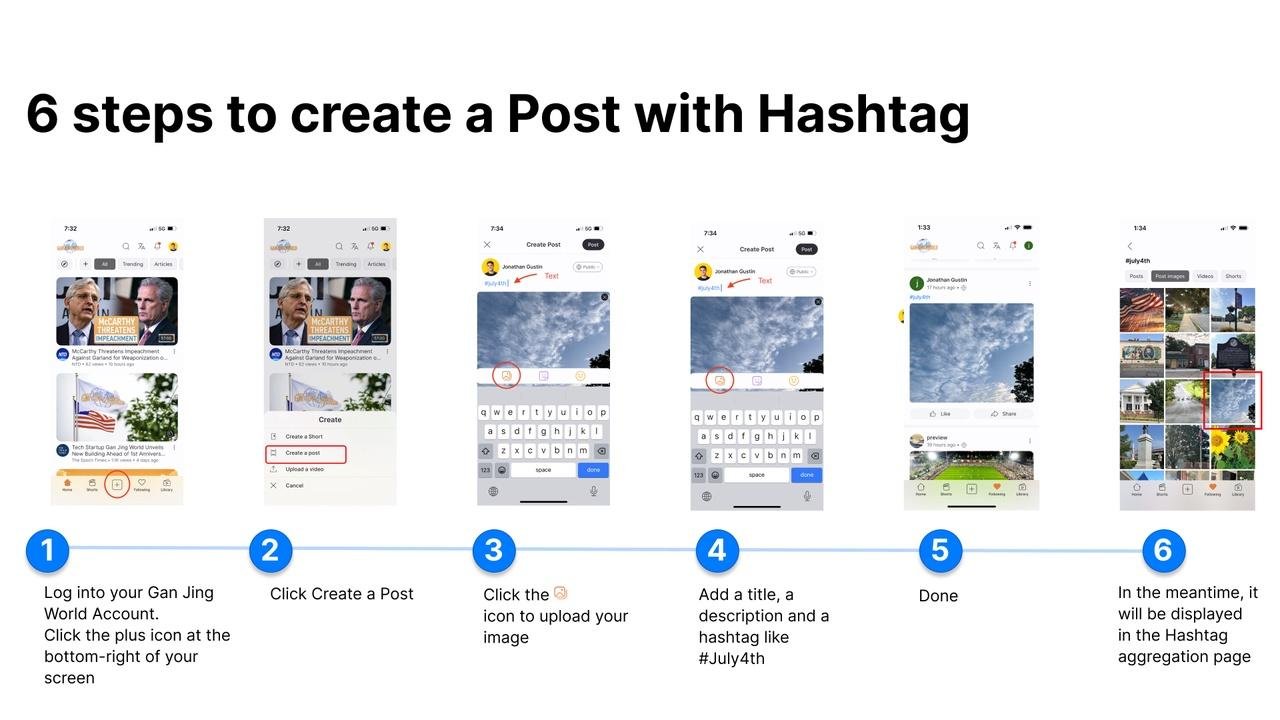
1. Log into your Gan Jing World Account
Click the plus icon + at the bottom of your screen
2. Click Create a Post
3. Click the  icon
icon to upload your image
4. Add a title, a description and a hashtag like #July4th
5. Click the drop-down menu on the top-right and select public to post publicly or select private to keep it on your own timeline. Done.
6. In the meantime, it will be displayed in the Hashtag aggregation page
Web
1. Log into your Gan Jing World account
Click  the
the icon on the top-right of your screen
2. Click the icon to upload your image
3. Add a title, a description and a hashtag like #July4th
4. Click the drop-down menu on the top-right and select public to post publicly or select private to keep it on your own timeline. Done.
6. In the meantime, it will be displayed on the Hashtag aggregation page
To make Posts that you've created accessible, you can add #hashtag in your Post, they will automatically be aggregated with other content with the same hashtag on the hashtag aggregation page.